INDEPENDENT PORTAL FOR IMPACT DATA
(API SYNC to web app)
Independent workspace - focus on a "Headless CMS" architecture.
This ensures the admin portal and the website are two separate entities connected only by a secure API.
Build the Administrative Back-Office Engine and the Partner Onboarding Flow.
Phase 1: The Partner Onboarding & Auth System
Goal: Create a secure gateway for external partners to join the workspace without seeing internal HCUSA data.
Prompt: "Build a 'Partner Onboarding' system for an independent Administrative Workspace.
Registration: Create a 'Request Access' page where field partners enter their Organization Name, Region (e.g., South Asia), and Contact Info.
Admin Review: Build an internal dashboard for HCUSA Admins to 'Approve' or 'Reject' these requests.
Roles: Upon approval, assign the user a
PARTNERrole. Partners should ONLY be able to see and edit the reports they personally create.Workspace Isolation: Ensure this portal is styled as a 'Back-Office' (dark slate/professional) to differentiate it from the public donor website."
Phase 2: Independent Data Submission (The Partner Form)
Goal: Build the high-density form for partners to upload raw data (Project IDs, GPS, and Metrics).
Prompt: "Create a 'Field Data Entry' form for approved Partners. This form must match the HCUSA impact schema:
Header: Fields for Project Name and a dropdown for Project ID (e.g., REP-001 to REP-999).
Impact Metrics: Inputs for 'Total Lives Impacted' and 'Budget'.
Verification Table: A dynamic list where partners add 'Deliverables' (e.g., 'Scholarships Awarded: 2,500').
GPS Mapping: A component to log coordinates (Lat/Long) for the project sites.
Workflow: When 'Submit' is clicked, set the status to
PENDING_VERIFICATION. The data should be saved to an internal database, NOT the public website yet."
Phase 3: The Admin "Verification & Sync" Engine
Goal: The final gatekeeper view where HCUSA Admins verify partner data and "Sync" it to the public website via API.
Prompt: "Build the 'Executive Verification Center' for HCUSA Admins.
Queue: Display a list of all
PENDING_VERIFICATIONreports submitted by partners.Audit Detail: When an Admin opens a report, show the partner's submitted GPS points, demographics (e.g., 90% Children), and deliverables.
The Sync Logic: Create a 'Finalize & Publish' button. When clicked:
It must trigger a secure
POSTrequest to the public website's API endpoint.It should only send fields marked as 'Verified.'
API Security: Generate a secret
WEB_SYNC_TOKENto ensure the public website only accepts data coming from this specific Admin Workspace."
Phase 4: Global Activity & Audit Log
Goal: Track all partner activity for full accountability.
Prompt: "Create an 'Activity Audit Log' for the Admin Workspace.
Tracking: List every action taken in the portal (e.g., 'Partner X submitted REP-003', 'Admin Y verified India GPS points').
Global Map: Build a view-only map for Admins that shows all submitted GPS pins globally, color-coded by status (Yellow for Pending, Green for Live on Website).
Sync History: Show a log of successful API transmissions to the public website with timestamps."
How this works for your team:
Field Partners log in to the Admin Workspace, fill out the high-density form, and pin their locations.
HCUSA Admins review that data in the same workspace.
Once the Admin is satisfied, they click "Sync", and the data is pushed via API to your Live Website (updating the pages seen in your PDF documentation).
Would you like me to provide a sample JSON payload that the Admin Portal should send to the website's API to ensure the "Verified Volume" updates correctly?
User Management & Support Module.
This allows HCUSA Admins to manage the "human" side of the platform—onboarding field partners, resetting passwords, and controlling access levels.
Phase 5: User Management & Account Support
Goal: Build a robust administrative interface to handle user lifecycles and security support.
Prompt: "Build a 'User Management' dashboard for the Admin Portal. This module is for managing staff and partner accounts.
1. User Directory: Create a high-density table listing all users with columns for: Name, Email, Role (Admin/PM/Partner), Status (Active/Pending/Suspended), and Last Login.
2. Account Editing & RBAC: Create a 'User Detail' slide-over or modal. Admins must be able to:
Toggle account status (e.g., suspend a partner who is no longer active).
Change User Roles (e.g., promote a Program Manager to Admin).
Update contact information.
3. Credential Support (Reset Flow): > - Add a 'Trigger Password Reset' button that generates a secure, one-time-use reset link sent to the user's email.
Add a 'Force Logout' feature that invalidates all active sessions for that user (critical for security if a device is lost).
4. Partner Onboarding Approval: Build a specific 'Pending Approval' view where Admins can review new partner sign-up requests, verify their documentation, and officially 'Activate' their account.
5. Security Logs: At the bottom of each user profile, show a 'Recent Activity' log (e.g., 'Reset password on April 20', 'Updated GPS data for REP-003')."
Administrative Workflow Summary
With this module, your "Back-Office Engine" is now fully equipped to handle both Data and People.
Feature | Action for Admin | Outcome |
New Partner | Review & Approve | Partner gains access to the 'Field Data' form. |
Lost Password | Trigger Reset | User receives an automated email via your secure backend. |
Role Change | Edit Account | Staff member gains 'Sync to Website' privileges. |
Security Risk | Suspend Account | Access is immediately revoked across all portal components. |
Developer Implementation Detail
When Greta AI builds this, ensure you emphasize that Password Resets must happen via an encrypted token sent to the user's email, rather than the Admin manually typing a new password. This ensures Zero-Knowledge Security—where even the Admin doesn't know the user's private credentials.
Security & Compliance to set up the automated email system for these account alert
This concludes the architecture for your Independent Admin Workspace. The User Management section with high security and administrative ease, use the following structured prompt.
Phase 5: User Management & Account Support
Goal: Create a secure control center for staff and partners to manage access and credentials.
Prompt: "Build a 'User Management' center for the HCUSA Admin Portal. This module must be separate from the data entry forms and only accessible to the
ADMINrole.1. User Directory: Create a high-density table to manage the 'Human' side of the platform. Include columns for Name, Email, Role (Staff vs. Partner), and Account Status (Active, Pending, Suspended).
2. Account Control Panel: Create a slide-over menu for each user that allows an Admin to:
Modify Roles: Upgrade a 'Partner' to 'Staff' or 'Executive'.
Status Toggle: Immediately 'Suspend' an account to revoke all portal access if a contract ends or a device is lost.
Profile Updates: Manually edit contact details or regional assignments (e.g., assigning a partner specifically to 'South Asia').
3. Credential Support (Zero-Knowledge Reset): > - Add a 'Trigger Password Reset' button. This should NOT let the admin see or set the password. Instead, it must generate a secure, timed token and send an automated email to the user.
Add a 'Revoke All Sessions' button that forces the user to log out on all devices.
4. Onboarding Queue: Build a specific 'Pending Approval' view. When a new field partner requests access, the Admin can review their credentials and 'Activate' them, which automatically sends them a 'Welcome & Set Password' email.
5. Global Audit Log: At the bottom of the page, show a feed of 'System Actions' (e.g., 'Admin Sarah reset the password for Partner Ahmed' or 'Account Suspended for User ID 098')."
How the Workspace Flows Together
Module | Purpose | Impact on Website |
User Management | Admins approve/manage Partners. | Ensures only authorized people can submit data. |
Partner Form | Partners submit GPS and Volume data. | Data sits in "Staging" (Invisible to donors). |
Verification Center | Admins review and click "Sync". | Data goes live on the donor website via API. |
Audit Log | Tracks every edit and login. | Provides 100% accountability for "Verified Transparency." |
Next Steps for Your Developer Team
Environment Variables: Ensure the API keys for the "Sync" between the Admin Portal and the Website are stored in a
.envfile and never committed to GitHub.Email Provider: You will need to connect an email service (like SendGrid or AWS SES) to the Admin Portal so that the "Password Reset" and "Onboarding" emails actually land in users' inboxes.
Would you like me to generate a "Final Integration Checklist" to give to your team to ensure the Sync between this new Portal and your existing Website is seamless?
INTEGRATED BUILD OPTION
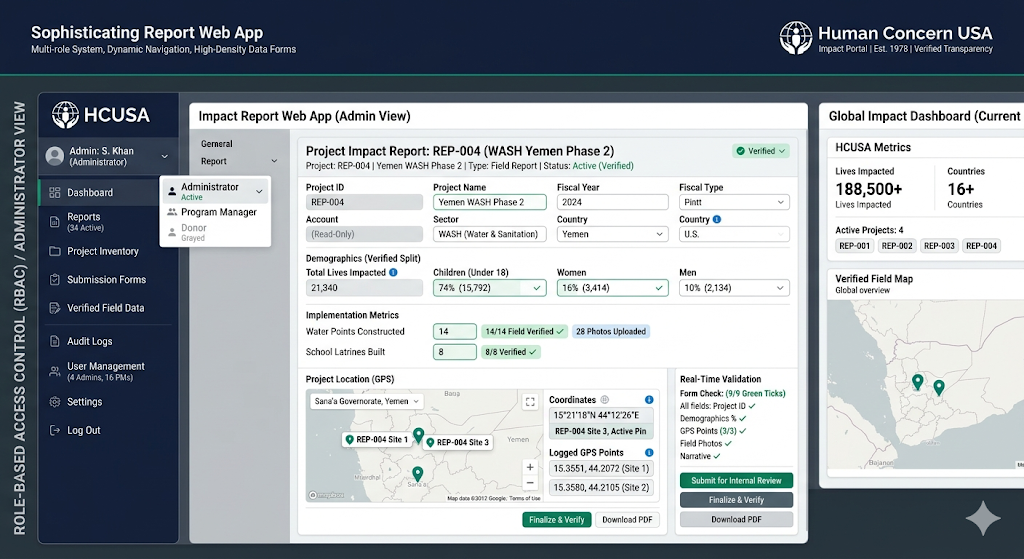
React + Tailwind CSS stack. It features a centralized Role-Based Access Control (RBAC) system, a dynamic sidebar, and high-density forms tailored for the Human Concern USA impact data schema (Project IDs, demographics, and GPS coordinates).
1. The RBAC & Navigation Logic
This configuration defines what each role can see and do within the portal.
JavaScript
// constants/roles.jsexport const ROLES = { ADMIN: 'ADMIN', PM: 'PROGRAM_MANAGER', EXEC: 'EXECUTIVE', DONOR: 'DONOR'}; export const NAV_ITEMS = [ { label: 'Dashboard', icon: 'LayoutDashboard', roles: [ROLES.ADMIN, ROLES.PM, ROLES.EXEC, ROLES.DONOR], path: '/' }, { label: 'Project Inventory', icon: 'Database', roles: [ROLES.ADMIN, ROLES.PM, ROLES.EXEC], path: '/projects' }, { label: 'Submit Report', icon: 'FilePlus', roles: [ROLES.ADMIN, ROLES.PM], path: '/submit' }, { label: 'Financial Audit', icon: 'ShieldCheck', roles: [ROLES.ADMIN, ROLES.EXEC], path: '/audit' }, { label: 'User Management', icon: 'Users', roles: [ROLES.ADMIN], path: '/users' },];2. The Multi-Role Sidebar Component
A developer-focused, high-contrast sidebar that filters items based on the active user profile.
JavaScript
import React from 'react';import * as Icons from 'lucide-react';import { NAV_ITEMS } from './constants/roles'; const Sidebar = ({ userRole }) => { return ( <div className="h-screen w-64 bg-slate-900 text-slate-300 flex flex-col border-r border-slate-800"> <div className="p-6 border-b border-slate-800"> <h1 className="text-white font-bold tracking-tight text-lg">HCUSA IMPACT</h1> <span className="text-xs font-mono text-emerald-400 uppercase">{userRole.replace('_', ' ')}</span> </div> <nav className="flex-1 p-4 space-y-2"> {NAV_ITEMS.filter(item => item.roles.includes(userRole)).map((item) => { const Icon = Icons[item.icon]; return ( <a key={item.label} href={item.path} className="flex items-center gap-3 p-2 rounded-md hover:bg-slate-800 hover:text-white transition-colors"> <Icon size={18} /> <span className="text-sm font-medium">{item.label}</span> </a> ); })} </nav> <div className="p-4 border-t border-slate-800 bg-slate-950"> <button className="flex items-center gap-3 w-full p-2 text-sm hover:text-red-400"> <Icons.LogOut size={18} /> Sign Out </button> </div> </div> );};3. Modular Data Entry Form (Admin/PM View)
This form is designed for high-density impact reporting, including the specific metrics found in the HCUSA documentation (e.g., REP-ID formats and demographics).
JavaScript
import React, { useState } from 'react'; const ImpactReportForm = () => { const [formData, setFormData] = useState({ projectId: 'REP-', budget: 0, livesImpacted: 0, sector: 'Education', childDemographic: 90, womanDemographic: 10 }); const [errors, setErrors] = useState({}); // Real-time validation logic const validate = (name, value) => { let error = ""; if (name === 'projectId' && !/^REP-\d{3}$/.test(value)) error = "Format must be REP-XXX"; if (name === 'budget' && value < 0) error = "Budget cannot be negative"; return error; }; const handleChange = (e) => { const { name, value } = e.target; setErrors({ ...errors, [name]: validate(name, value) }); setFormData({ ...formData, [name]: value }); }; return ( <form className="max-w-4xl bg-white p-8 rounded-xl shadow-sm border border-slate-200"> <h2 className="text-xl font-semibold mb-6">Verified Project Documentation</h2> <div className="grid grid-cols-2 gap-6"> {/* Project ID Field */} <div className="flex flex-col gap-1"> <label className="text-xs font-bold text-slate-500 uppercase">Project ID</label> <input name="projectId" value={formData.projectId} onChange={handleChange} className={`p-2 border rounded font-mono ${errors.projectId ? 'border-red-500 bg-red-50' : 'border-slate-300'}`} /> {errors.projectId && <span className="text-red-500 text-xs">{errors.projectId}</span>} </div> {/* Impact Metrics */} <div className="flex flex-col gap-1"> <label className="text-xs font-bold text-slate-500 uppercase">Total Budget (USD)</label> <input type="number" name="budget" onChange={handleChange} className="p-2 border border-slate-300 rounded" /> </div> {/* Demographics Slider - Reflecting the 90/10 split in documentation */} <div className="col-span-2 p-4 bg-slate-50 rounded-lg"> <label className="text-xs font-bold text-slate-500 uppercase mb-4 block">Recipient Demographics (%)</label> <div className="flex gap-4 items-center"> <span className="text-sm">Children: {formData.childDemographic}%</span> <input type="range" className="flex-1 accent-emerald-500" onChange={(e) => setFormData({...formData, childDemographic: e.target.value, womanDemographic: 100 - e.target.value})} /> <span className="text-sm">Women: {formData.womanDemographic}%</span> </div> </div> </div> <button className="mt-8 bg-slate-900 text-white px-6 py-2 rounded-lg font-medium hover:bg-slate-800 transition-all"> Finalize & Verify Report </button> </form> );};4. Donor View-Only Dashboard
This layout removes all "Edit" or "Submit" functions, focusing on the verified transparency metrics (188,500+ lives reached).
JavaScript
const DonorDashboard = ({ reportData }) => ( <div className="p-8"> <header className="mb-8"> <h1 className="text-3xl font-bold text-slate-900">Global Impact Overview</h1> <p className="text-slate-500">Verified field documentation for 2023-2024</p> </header> <div className="grid grid-cols-1 md:grid-cols-3 gap-6"> <div className="bg-emerald-50 p-6 rounded-xl border border-emerald-100"> <p className="text-emerald-700 text-sm font-bold uppercase">Total Lives Impacted</p> <p className="text-4xl font-black text-emerald-900">188,500+</p> </div> {/* Additional Stats Cards */} </div> <div className="mt-12 overflow-x-auto"> <table className="w-full text-left border-collapse"> <thead className="bg-slate-50 border-b border-slate-200"> <tr> <th className="p-4 text-xs font-bold text-slate-500 uppercase">Project</th> <th className="p-4 text-xs font-bold text-slate-500 uppercase">Region</th> <th className="p-4 text-xs font-bold text-slate-500 uppercase">Sector</th> <th className="p-4 text-xs font-bold text-slate-500 uppercase">Impact</th> </tr> </thead> <tbody className="divide-y divide-slate-100"> {/* Map through reports retrieved from server */} <tr className="hover:bg-slate-50 transition-colors"> <td className="p-4 font-medium">Girls Education Access</td> <td className="p-4 text-slate-600">South Asia</td> <td className="p-4"><span className="bg-blue-100 text-blue-700 px-2 py-1 rounded text-xs">Education</span></td> <td className="p-4 font-mono font-bold">8,500</td> </tr> </tbody> </table> </div> </div>);5. Security Architecture (Backend Logic)
To follow the requirement of never exposing secrets, the frontend makes requests to an internal API proxy.
Frontend Request:
fetch('/api/v1/reports')Server-Side (Node.js/Next.js):
JavaScript
// api/reports.js (Running on Server)export default async function handler(req, res) {// API Key is stored in Environment Variables, never sent to the browserconst API_KEY = process.env.HCUSA_ENCRYPTED_KEY;const response = await fetch('https://external-db.hcusa.org/data', {headers: { 'Authorization': `Bearer ${API_KEY}` }});const data = await response.json();res.status(200).json(data);}
Summary of Features
High Density: Tables and forms maximize screen real estate for PMs.
Verification-Ready: Dedicated fields for "Verified Volume" (Schools, Scholarships, Teachers).
Modular Architecture: The
SidebarandImpactReportFormcan be updated independently without breaking the RBAC flow.
AI PROMPT
The "Back-Office" portal acts as the source of truth.
When a Program Manager or Admin saves a report in the management app, it should automatically sync and update the web components the donor sees.
Ensuring the high-density internal forms map perfectly to the sleek web pages donors interact with.
Phase 1: Database Schema & API Handlers (The "Bridge")
Goal: Define how the internal data fields (REP-ID, GPS, Demographics) connect to the website's frontend components.
Prompt: "I need to build the backend schema for the Human Concern USA portal. Create a JSON schema that represents a 'Project Report'. It must include:
projectId(string, e.g., 'REP-003')
slug(for the website URL, e.g., '/reports/girls-education-access')
heroMetrics(livesImpacted, budget, activeLocations)
demographics(objects for Children, Women, and Men with percentage and count)
timeline(an array of events with 'date' and 'description')
gpsPoints(an array of objects with 'lat', 'lng', and 'label' for the interactive map)Create a mock API GET handler that returns this data and a POST handler for the Admin form to update it."
Phase 2: Management Portal Sidebar (Staff View)
Goal: Create the navigation for staff to manage these web pages without touching the donor-facing code.
Prompt: "Build a sidebar for the 'Staff Management Portal' using React and Tailwind.
Style: Use a dark 'Admin' theme (Slate-900) to distinguish it from the light/white Donor website.
Navigation: Include: 'Dashboard' (Global metrics), 'Web Pages' (List of active reports), 'Field Data Entry' (The form for new reports), and 'Media Library' (For uploading project photos).
Role Logic: Only 'ADMIN' should see the 'Media Library' and 'Delete' options. 'PROGRAM_MANAGER' can only see 'Web Pages' and 'Field Data Entry'."
Phase 3: High-Density Data Entry Form (Content Management)
Goal: Build the form that populates the specific sections seen on the donor website (e.g., the Implementation Timeline).
Prompt: "Build a high-density 'Report Editor' form. This form is used to update the donor-facing website pages.
Section A (Header): Inputs for Project Title and Executive Summary.
Section B (Web Metrics): Create three input cards for 'Lives Impacted', 'Budget', and 'Locations'—these map directly to the top stats on the website.
Section C (Timeline Builder): Create a dynamic list where a user can 'Add Step'. Each step needs a Month/Year and a Short Description (e.g., 'AUG 2023: SCHOOL OPENINGS').
Section D (Map Integration): A table where users enter Lat/Long coordinates. These must automatically plot as pins on the donor's website map.
Validation: Add a 'Preview on Website' button that opens a mock-up of the donor page with the current form data."
Phase 4: Role-Based Publishing Workflow
Goal: Ensure data is verified before it goes live on the donor website.
Prompt: "Implement a publishing workflow for the reports.
When a Program Manager saves a form, set the status to
DRAFT.Create an 'Approvals' dashboard for the ADMIN role.
Add a 'Publish to Website' button that is ONLY visible to Admins.
Once clicked, the status changes to
LIVE, and the data should become visible on the public donor navigation and home page.Use a 'Verification Badge' logic where the UI shows a 'Verified' checkmark on the donor site only if the Admin has confirmed the field documentation."
How this maps to your provided PDFs:
PDF Home Page: The 'Active Projects' grid is populated by the "Web Pages" list in Phase 2.
PDF Detailed Page: The 'Implementation Timeline' and 'Verified Volume' sections are populated by the dynamic lists in Phase 3.
GPS Map: The locations donors see are managed by the coordinate table in the Staff Portal.
OPTIMIZE CODES
Perform a comprehensive code audit and optimization of the current application to ensure production-readiness. Focus on identifying and resolving runtime errors, refactoring inefficient logic, and improving overall performance.
- Audit the codebase for memory leaks and redundant operations.
- Resolve all console errors and warnings.
- Standardize code formatting and remove dead code.
- Ensure all environment variables are handled securely; never expose secrets in frontend code.
Execute these improvements systematically. Start by analyzing the current build logs, then refactor the core modules, and finally verify the stability of the production build.